
Blog
What Is MCP?
A Complete Guide to Model Context Protocol, WebMCP & AI Agents for Web Developers in 2026
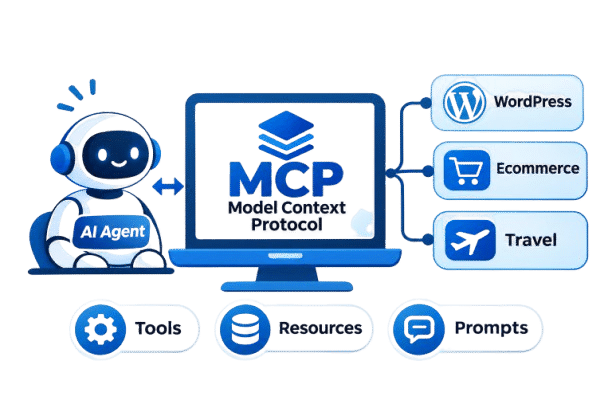
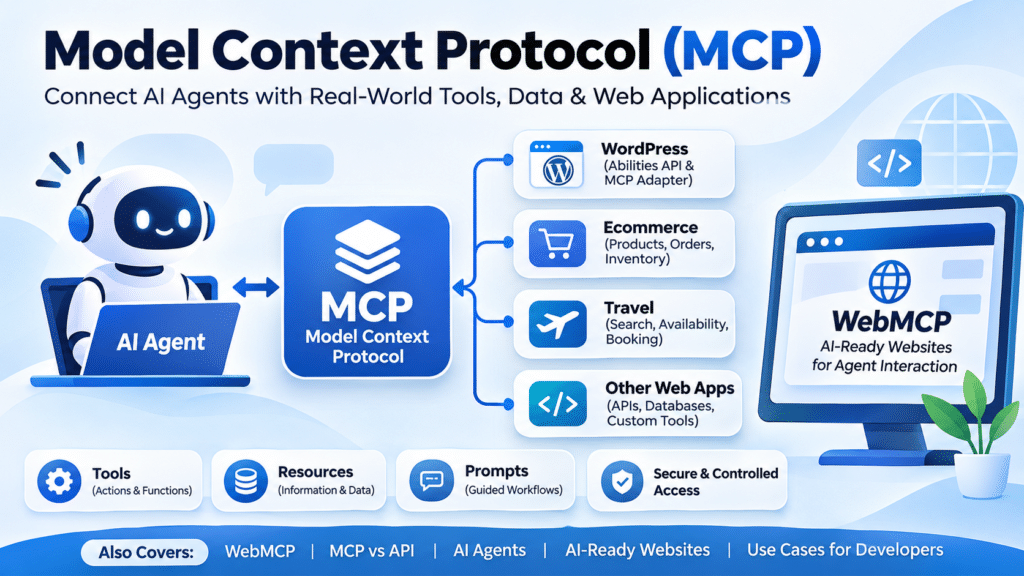
What Is MCP? A Complete Guide to Model Context Protocol, WebMCP & AI Agents for Web Developers in 2026
Artificial intelligence is changing the way people interact with software.
A few years ago, a user would open a website, navigate through menus, fill in a form and click buttons to complete a task. Today, AI assistants and AI agents are increasingly becoming another way to interact with software.
But this creates an important technical question: How can an AI application securely discover and use the tools, data and functions provided by different websites and software systems?
This is where Model Context Protocol (MCP) comes in.
MCP is an open protocol designed to standardise how AI applications connect with external tools, data sources and capabilities. Instead of every AI application requiring a completely different integration for every service, MCP provides a common way for AI systems to discover and interact with capabilities exposed by an MCP server.
For web developers, this is becoming an increasingly important area of AI-powered web development, agentic applications and modern software integration.
And it is not limited to one country or one type of business. Developers working with WordPress, JavaScript, Python, PHP, ecommerce platforms, SaaS products and custom web applications can all potentially work with MCP.
Quick Answer: What Is MCP?
MCP stands for Model Context Protocol.
In simple terms, MCP is a standardised communication layer that allows an AI application to interact with external tools and information.
Think of it this way:
The idea is not that MCP magically gives an AI access to everything. Instead, a developer creates or exposes specific capabilities through an MCP server. An AI client can then discover those capabilities and use them according to the permissions and rules defined by the application.
The official MCP specification describes MCP as an open protocol for connecting LLM applications with external data sources and tools. The specification is actively evolving, and the July 2026 release introduced a stateless protocol core, capability discovery improvements and additional security and routing changes. Read the MCP specification.
What Is MCP?
MCP stands for Model Context Protocol.
In simple terms, MCP is a standardised communication layer that allows an AI application to interact with external tools and information.
Think of it this way:
AI application → Custom integration → Application
With MCP:
AI application → MCP → Tools / Data / Applications
The idea is not that MCP magically gives an AI access to everything.
Instead, a developer creates or exposes specific capabilities through an MCP server. An AI client can then discover those capabilities and use them according to the permissions and rules defined by the application.
A simple example
Imagine you have an ecommerce website.
Normally, an AI assistant cannot simply decide to access your order database.
You might have to build a custom integration that allows the AI application to communicate with your ecommerce system.
With MCP, you can expose carefully selected capabilities such as:
- ✔ Search products
- ✔ Check stock
- ✔ Find an order
- ✔ Retrieve product information
- ✔ Generate a sales report
- ✔ Check website information
- ✔ Create a draft
- ✔ Run a diagnostic
The AI application can discover the tools that are available and decide which tool is appropriate for a particular request.
What Is an AI Agent?
To understand MCP properly, you also need to understand AI agents.
A traditional AI chatbot generally works like this:
An AI agent can work more like this:
For example, imagine saying:
“Find my five best-selling products from last month and prepare a summary.”
An AI agent could potentially:
- 1. Access an approved sales tool.
- 2. Retrieve sales data.
- 3. Analyse the information.
- 4. Identify the five highest-selling products.
- 5. Generate a summary.
- 6. Return the result.
The important point is that the AI is not merely generating text. It is interacting with software tools.
MCP provides one standardised way for those tools and AI applications to communicate.
MCP vs AI vs AI Agents
These terms are often confused.
Artificial Intelligence
AI is the broader field of systems capable of performing tasks that normally require human intelligence.
Large Language Model
An LLM is a model capable of understanding and generating language.
AI Application
An AI application uses models to provide a user-facing experience.
AI Agent
An AI agent can use tools, information and actions to accomplish a goal.
MCP
MCP is a protocol that can standardise how AI applications discover and interact with external capabilities.
Easy Way to Remember
AI is the intelligence.
The AI agent is the worker.
Tools are the capabilities.
MCP is one of the communication standards connecting the agent with those capabilities.
How Does MCP Work?
At a high level, an MCP architecture contains an MCP host, an MCP client and an MCP server.
The terminology can initially sound complicated, so let's simplify it.
1. MCP Host
The host is the AI application or environment in which the interaction happens.
For example, an AI-powered application may act as the host.
The host manages the overall AI experience and may create MCP client connections.
2. MCP Client
The MCP client handles communication between the AI application and a particular MCP server.
It acts as the connection layer.
3. MCP Server
The MCP server exposes capabilities that an AI application can use.
Those capabilities can include tools, resources and prompts.
↓
AI Application / Host
↓
MCP Client
↓
MCP Server
↓
Tools / Resources / External Systems
The exact implementation can vary, but this basic model is useful for understanding MCP.
What Are MCP Tools?
An MCP tool is an executable capability.
For example, a tool could be:
- ✔
search_products - ✔
get_order - ✔
create_draft - ✔
check_inventory - ✔
get_weather - ✔
run_report - ✔
analyse_page - ✔
get_customer_details
The AI can discover the available tools and call an appropriate one when the application allows it.
This is particularly interesting for developers because a website or software platform can expose specific functions rather than giving an AI unrestricted access to the entire system.
That distinction is extremely important for security.
What Are MCP Resources?
Resources are another important MCP concept.
A resource generally represents information that an AI application can access as context.
For example:
- ✔ Documentation
- ✔ Files
- ✔ Database information
- ✔ Configuration information
- ✔ Reports
- ✔ Website data
The exact implementation depends on the MCP server.
Easy Way to Remember
Tools = things the AI can do
Resources = information the AI can access
What Are MCP Prompts?
MCP also supports prompts as a structured primitive.
A prompt can provide a predefined template or workflow for a particular task.
For example, a development platform might provide a prompt such as:
“Analyse this website's technical SEO issues.”
The prompt can help guide the AI towards a particular workflow.
This means MCP is not simply about sending messages between an AI and a server. It provides a structured ecosystem for exposing capabilities and information.
MCP vs API: What Is the Difference?
This is one of the most important questions for web developers.
If APIs already exist, why do we need MCP?
The simplest explanation
An API is designed for software to communicate with software. MCP is designed to standardise how AI applications discover and use capabilities exposed to them.
For example, you might have a REST API:
GET /products
POST /orders
GET /customers
A developer knows the endpoints and builds an integration around them.
With MCP, the AI-facing integration can expose structured capabilities that an MCP-aware client can discover and invoke.
| API | MCP |
|---|---|
| Usually requires the developer to know endpoints, HTTP methods and parameters | Provides a standardised framework through which AI applications can discover capabilities |
| Software-to-software communication | AI application-to-tool/context integration |
| Developer usually defines the integration directly | AI client can discover available tools exposed by an MCP server |
This does not mean MCP replaces APIs.
In many cases, an MCP server can sit on top of existing APIs and services.
So MCP and APIs can work together rather than being direct competitors.
MCP Does Not Replace Your Backend
This is an important misconception.
MCP does not mean you should throw away your existing:
- ✔ REST APIs
- ✔ Databases
- ✔ Authentication systems
- ✔ Backend applications
- ✔ WordPress functions
- ✔ SaaS integrations
Instead, MCP can become another interface through which approved capabilities are exposed to AI applications.
Website
   ↓
Backend
   ↓
Database

Existing API ───────────────→ Mobile App
        │
        └──→ MCP Server ───→ AI Agent
Your existing application architecture can remain in place while MCP provides an additional AI-facing layer.
What Is WebMCP?
Now we come to a newer and particularly interesting development for frontend and web developers:
WebMCP.
WebMCP is related to the broader idea of making web applications directly usable by AI agents.
The current WebMCP specification is still experimental. A draft Community Group Report published in October 2026 describes WebMCP as a JavaScript interface that allows web applications to expose functionality as tools that AI agents and browser-based agents can invoke. Importantly, the document explicitly states that it is not currently a W3C Standard or on the W3C Standards Track.
Read the WebMCP draft specification.
Important
You should currently think of WebMCP as an emerging web technology, rather than a finished universal web standard.
How Is WebMCP Different from MCP?
MCP and WebMCP are related, but they are not exactly the same thing.
| MCP | WebMCP |
|---|---|
| A broader protocol for connecting AI applications with external tools and information | An emerging browser/web-facing approach for web applications |
| Can connect AI applications with servers | Designed for web applications |
| Commonly used through MCP clients and servers | Uses web-side JavaScript interfaces |
| Useful for backend and external integrations | Particularly relevant to frontend/web experiences |
| Mature ecosystem but evolving | Emerging/experimental web technology |
WebMCP documentation currently describes web applications as being able to expose JavaScript functions with natural-language descriptions and structured schemas so agents can invoke them.
Why Is WebMCP Important for Web Developers?
The traditional web was primarily designed around human interaction.
A person:
- 1. Opens a website.
- 2. Reads the page.
- 3. Finds a button.
- 4. Opens a form.
- 5. Enters information.
- 6. Clicks submit.
An AI agent does not necessarily want to navigate the entire interface in the same way.
It may simply want to perform a task.
For example:
“Book the cheapest available appointment next Tuesday.”
A traditional browser agent may need to find the correct page, understand the layout, locate the calendar, click through options and fill forms.
A website exposing appropriate agent-facing tools could potentially make that process much more structured.
That is the broader idea behind technologies such as WebMCP.
Cloudflare has also demonstrated a developer preview for exposing WebMCP interfaces to browser agents, while experimental WebMCP support has been associated with Chrome's newer browser capabilities. Read Cloudflare's WebMCP overview.
Is WebMCP a Replacement for Websites?
No.
WebMCP does not mean websites will disappear.
Human users will still need:
- ✔ Visual interfaces
- ✔ Navigation
- ✔ Content
- ✔ Accessibility
- ✔ Forms
- ✔ Images
- ✔ Product pages
- ✔ Checkout experiences
- ✔ Branding
Instead, the emerging idea is that a website may eventually need two experiences:
Human Experience
Designed for people.
Agent Experience
Designed so authorised AI agents can interact with specific capabilities efficiently.
This could become an important part of future web development.
MCP and WordPress
This is where MCP becomes especially relevant to WordPress developers.
WordPress has been moving towards making its functionality more structured and discoverable for modern integrations.
WordPress 6.9 introduced the Abilities API, which provides a standardised way to register and discover distinct units of functionality within WordPress. These abilities can have defined inputs, outputs and permissions.
WordPress has also developed the MCP Adapter, which can translate WordPress Abilities into MCP tools that AI applications can discover and invoke.
Read the WordPress Abilities API documentation.
Read the WordPress MCP Adapter guide.
This is significant for WordPress developers.
What Is the WordPress MCP Adapter?
The WordPress MCP Adapter connects WordPress capabilities with the Model Context Protocol.
In simple terms:
For example, a WordPress plugin could expose a specific capability.
An AI client can then discover that capability and invoke it when properly authorised.
WordPress documentation explains that the MCP Adapter can expose registered Abilities as MCP tools and can also work with resources and prompts.
What Can an AI Agent Potentially Do With WordPress?
Depending on the capabilities you deliberately expose and the permissions you grant, an AI workflow could potentially:
- ✔ Read website information
- ✔ Retrieve content
- ✔ Find posts
- ✔ Analyse website data
- ✔ Create drafts
- ✔ Update permitted content
- ✔ Run diagnostics
- ✔ Work with custom plugin functionality
- ✔ Retrieve structured information
- ✔ Assist with content workflows
The important phrase is:
Depending on permissions.
MCP does not mean an AI automatically gets administrator access to WordPress.
WordPress's Abilities system includes permission checks, and the MCP Adapter documentation strongly recommends carefully controlling what capabilities are exposed.
A Practical WordPress Example
Imagine you run a WordPress website for a travel company.
You have hundreds of travel pages.
A normal workflow might be:
An AI-assisted workflow could eventually look more like:
You:
“Find all destination pages that have missing meta descriptions.”
The AI could use an approved tool to retrieve the relevant content.
Then you could ask:
“Create draft meta descriptions for those pages.”
The AI generates them.
You review the changes.
Then, if the system and permissions allow it, an approved tool could update the relevant drafts.
This is where MCP becomes interesting for agencies and WordPress developers.
MCP for WordPress Developers
For a WordPress developer, MCP opens possibilities beyond simple content generation.
Content Management
Create drafts, retrieve posts, update permitted content and search pages.
SEO Workflows
Analyse metadata, identify missing fields, check content structure and generate recommendations.
Website Diagnostics
Retrieve environment information, check selected configuration and run approved diagnostics.
Ecommerce
Retrieve product information, check inventory, retrieve order information and generate reports.
Agency Workflows
Website audits, client reporting, content management and maintenance workflows.
The WordPress AI team specifically highlights use cases ranging from conversational site management to complex agency workflows such as content migration and performance optimisation.
MCP and Ecommerce
MCP could also become useful for ecommerce development.
Imagine an online store connected to an AI agent.
A customer might ask:
“Find me a waterproof jacket under £150 that is available in size M.”
The AI agent needs access to structured product information.
An ecommerce system could expose carefully designed tools such as:
search_products()
get_product()
check_inventory()
get_shipping_options()
The AI can then use those tools to complete the task.
For businesses, this could eventually create a new type of agent-assisted commerce.
The technology is still developing, so businesses should not assume every AI agent can currently perform every ecommerce task automatically.
MCP and Custom Web Development
MCP is not limited to WordPress.
A developer building a custom application using:
- ✔ JavaScript
- ✔ TypeScript
- ✔ Python
- ✔ PHP
- ✔ Node.js
- ✔ React
- ✔ Next.js
- ✔ Databases
- ✔ SaaS platforms
- ✔ Internal business software
can potentially build an MCP server or integrate an MCP client depending on the use case.
For example:
React Frontend
      ↓
Node.js Backend
      ↓
Database
      ↓
Business Logic
      ↓
MCP Server
      ↓
AI Agent
The AI does not need direct unrestricted access to the database.
Instead, the developer can expose specific business functions.
That is a much safer architectural approach.
Why Developers Should Not Give AI Direct Database Access
This is one of the most important security principles.
Suppose your database contains:
- ✔ Customer names
- ✔ Email addresses
- ✔ Orders
- ✔ Payment information
- ✔ Internal notes
- ✔ Business data
Giving an AI unrestricted database access would create significant security and privacy risks.
Instead, expose controlled functions.
get_order_status(order_id)
is generally easier to control than:
run_any_sql_query()
The developer can define:
- ✔ What the AI can access
- ✔ Which user can access it
- ✔ Which parameters are allowed
- ✔ Which operations are read-only
- ✔ Which actions require approval
This is why least privilege is essential when building AI agent integrations.
MCP Security: What Developers Need to Know
MCP can be powerful, which means security cannot be an afterthought.
If an AI can call a tool that changes data, that tool should be treated like any other sensitive application endpoint.
1. Use Least Privilege
Give an AI client only the permissions it actually needs.
2. Avoid Unnecessary Write Access
If an AI only needs to read information, do not give it permission to modify information.
3. Protect Destructive Actions
Deleting content, changing settings or modifying important records should require appropriate permissions and, where appropriate, human confirmation.
4. Validate Inputs
Never assume that parameters supplied through an AI workflow are automatically safe.
5. Authenticate Users and Clients
Use appropriate authentication mechanisms.
6. Monitor Activity
Log important tool calls so unusual activity can be investigated.
7. Separate Development and Production
Experiment with MCP in a staging or local environment before connecting it to critical production systems.
WordPress's MCP guidance specifically recommends careful permission callbacks, dedicated users, limiting exposed abilities, authentication and monitoring/logging.
Can MCP Be Used Without AI?
Technically, MCP is designed around AI applications and their interaction with external capabilities, so its primary purpose is AI integration.
If your project has no AI or agentic workflow, you may not need MCP.
For conventional software-to-software communication, REST APIs, GraphQL, webhooks or other integration methods may still be the better choice.
MCP becomes particularly interesting when the consumer of those capabilities is an AI application or agent.
Is MCP Difficult to Learn?
The basic concept is easier than it initially sounds.
If you already understand:
- ✔ APIs
- ✔ JSON
- ✔ HTTP
- ✔ Authentication
- ✔ JavaScript or Python
- ✔ Backend development
you already have many of the concepts required to understand MCP.
The bigger learning curve comes from understanding:
- ✔ MCP architecture
- ✔ Tools
- ✔ Resources
- ✔ Prompts
- ✔ Authentication
- ✔ Permissions
- ✔ AI agent behaviour
- ✔ Server implementation
- ✔ Security
- ✔ Production deployment
You do not need to become an AI researcher to start learning MCP.
For web developers, understanding how AI systems interact with software is arguably more useful than learning the underlying mathematics of large language models.
How Can a Web Developer Start Learning MCP?
A practical learning path could look like this.
Step 1: Understand APIs
Learn HTTP, REST APIs, JSON, authentication, API requests and webhooks.
Step 2: Understand AI Agents
Learn how an AI model can select tools, call functions, receive results, continue a workflow, ask for missing information and complete multi-step tasks.
Step 3: Learn MCP Concepts
Understand MCP host, MCP client, MCP server, tools, resources, prompts, transport and permissions.
Step 4: Build a Small MCP Server
Start with something simple such as get_weather() or get_company_info(), then move towards more useful application functionality.
Step 5: Connect It to an AI Client
Test the server with an MCP-compatible AI environment.
Step 6: Add Authentication
Do not move sensitive functionality into production without proper access control.
Step 7: Build a Real Business Use Case
For example: AI Agent → MCP → WordPress → Content Workflow or AI Agent → MCP → Ecommerce → Product Search.
This is where the technology becomes commercially useful.
MCP and the Future of Web Development
The web is moving from a model where humans are the only active users towards a world where both humans and software agents may interact with websites.
This does not mean humans become irrelevant.
Instead, developers may increasingly need to consider:
Human-readable interfaces
For people.
Machine-readable data
For software.
Agent-accessible capabilities
For AI systems.
This could influence how developers design:
- ✔ Websites
- ✔ APIs
- ✔ SaaS platforms
- ✔ Ecommerce systems
- ✔ CMS platforms
- ✔ Authentication systems
- ✔ Databases
- ✔ Web applications
In other words, AI-ready web development may become another consideration alongside responsive design, accessibility, SEO, performance and security.
What Does This Mean for WordPress Developers?
WordPress developers have a particularly interesting opportunity because WordPress already powers a huge number of websites.
With the Abilities API and MCP Adapter, WordPress is developing a structured route for exposing site functionality to AI systems. WordPress documentation describes Abilities as a central registry for functionality that can be discovered and executed, while the MCP Adapter bridges those abilities to MCP.
This means future WordPress development could increasingly involve questions such as:
- ✔ Can this plugin expose useful capabilities?
- ✔ Can an AI agent safely interact with this functionality?
- ✔ Which actions should be read-only?
- ✔ Which actions require authentication?
- ✔ Which actions require human approval?
- ✔ How should AI-facing permissions be designed?
That creates a new development layer on top of traditional WordPress development.
Is MCP the Future of Web Development?
It would be too early to say that MCP will become the only standard for AI-powered applications.
Technology standards evolve.
MCP itself continues to evolve, and the July 2026 specification introduced significant architectural changes.
Read the July 2026 MCP specification release.
WebMCP is even earlier in its development. Its October 2026 specification is currently a Community Group Report rather than a W3C Standard.
Read the current WebMCP draft.
The Bigger Direction
AI applications need reliable ways to interact with software.
MCP is one important approach to solving that problem.
MCP Use Cases Across Different Industries
MCP is not restricted to technology companies.
Potential use cases exist across many industries.
Healthcare
AI systems could interact with approved scheduling or administrative tools.
Finance
AI assistants could retrieve authorised reports or financial information.
Ecommerce
Agents could search products, check inventory and assist with orders.
Travel
AI systems could work with approved availability, itinerary or destination tools.
Education
Agents could access authorised course information and learning resources.
Real Estate
AI tools could search property data and generate structured reports.
Marketing
AI agents could interact with approved analytics, campaign or content tools.
Software Development
AI coding assistants can use development tools, documentation and project-specific capabilities.
The exact implementation depends on the business, regulations, data sensitivity and security architecture.
Why MCP Matters for Freelancers and Web Agencies
For freelancers and agencies, MCP is not only a technical subject.
It may become a new service opportunity.
Instead of offering only:
Website Design
You could eventually offer:
AI-Ready Website Development
For example:
- ✔ AI agent integrations
- ✔ MCP server development
- ✔ WordPress MCP integrations
- ✔ AI-enabled business workflows
- ✔ AI-ready ecommerce websites
- ✔ Custom MCP tools
- ✔ AI automation
- ✔ Agent-friendly web applications
This is especially relevant for agencies already working with WordPress, custom development and APIs.
For example, Webtimize Solutions already works across WordPress, WooCommerce, Shopify, custom development, responsive websites and SEO, making AI-ready web development a natural technology extension rather than a completely unrelated service.
MCP and SEO: Are They Connected?
MCP itself is not an SEO ranking factor.
Important
Do not write:
“MCP will make your website rank higher on Google.”
There is no basis for such a claim.
However, MCP and AI-agent technology could affect how users interact with websites.
SEO will continue to involve:
- ✔ Helpful content
- ✔ Technical accessibility
- ✔ Crawlability
- ✔ Page performance
- ✔ Structured information
- ✔ User experience
- ✔ Authority
- ✔ Search intent
Meanwhile, AI-agent accessibility may become another consideration for certain web applications.
So think of:
as related but distinct concepts.
MCP, AI Search and the Future of Search
Search behaviour is already changing.
Users increasingly ask AI systems questions instead of manually visiting multiple websites.
That creates a new challenge for businesses:
How does my website become useful not only to search engines and people, but also to AI systems?
There is no single "MCP SEO" technique that solves this.
Instead, developers and businesses should focus on:
- ✔ High-quality information
- ✔ Structured data
- ✔ Accessible content
- ✔ Strong technical foundations
- ✔ Clear APIs
- ✔ Secure integrations
- ✔ Useful agent capabilities where appropriate
This is part of the wider shift towards AI-powered search and agentic web experiences.
Common MCP Mistakes Beginners Should Avoid
Mistake 1: Thinking MCP Is an AI Model
It is not. MCP is a protocol.
Mistake 2: Thinking MCP Replaces APIs
It does not. MCP can work alongside APIs.
Mistake 3: Giving AI Unrestricted Access
Never assume an AI should have administrator-level access.
Mistake 4: Exposing Every Function
Only expose capabilities that genuinely need to be available.
Mistake 5: Ignoring Authentication
AI integrations still need security.
Mistake 6: Treating WebMCP as a Finished Standard
WebMCP is still experimental and evolving. The current specification explicitly identifies itself as a draft Community Group Report rather than a W3C Standard.
Mistake 7: Building Without a Real Use Case
Do not add MCP simply because it is trendy. Start with a real problem.
Frequently Asked Questions
What does MCP stand for?
MCP stands for Model Context Protocol.
What is MCP used for?
MCP provides a standardised way for AI applications to interact with external tools, data sources and capabilities.
Is MCP an API?
No. MCP is a protocol for AI-to-tool/context integration. MCP servers can, however, use APIs behind the scenes.
What is an MCP server?
An MCP server exposes tools, resources and other capabilities that an MCP client can interact with.
What is an MCP client?
An MCP client manages the connection between an AI application and an MCP server.
What is WebMCP?
WebMCP is an emerging web technology that allows web applications to expose functionality as tools for AI agents. It is still experimental.
Is MCP useful for WordPress?
Yes. WordPress has an Abilities API and an MCP Adapter that can expose selected WordPress functionality to AI applications.
Can MCP replace REST APIs?
No. REST APIs and MCP can work together.
Is MCP only for developers?
The implementation is primarily a developer concern, but the resulting AI-powered workflows can benefit businesses, content teams, ecommerce companies and other users.
Is MCP secure?
MCP can be implemented securely, but security depends heavily on authentication, permissions, input validation, tool design and monitoring. Developers should follow least-privilege principles and avoid exposing sensitive or destructive functionality unnecessarily.
Should every website use MCP?
No. MCP makes sense when a website or application has a genuine AI-agent use case. A simple brochure website may not need it.
Final Thoughts
The most important thing to understand about MCP is that it is not simply another AI buzzword.
It represents a broader change in how software can interact with AI.
Traditional web development has largely focused on building interfaces for humans.
The next generation of applications may need to consider three audiences:
Humans
People who use visual interfaces and websites.
Traditional Software
Applications and systems communicating through established interfaces.
AI Agents
AI systems that can use tools and interact with software.
MCP provides a standardised approach for connecting AI applications with external capabilities, while emerging technologies such as WebMCP explore how websites themselves can become more directly usable by browser-based agents.
For developers, the opportunity is significant.
You do not need to abandon WordPress, APIs, JavaScript, PHP, React or traditional web development.
Instead, you can build on those skills and learn how to make applications AI-aware, AI-integrated and eventually agent-ready.
For WordPress developers in particular, the combination of the Abilities API and MCP Adapter provides a practical starting point for experimenting with AI-powered workflows today.
The web is changing.
And developers who understand how websites, APIs, AI agents and tools can work together will be better prepared for what comes next.
Useful Resources & Further Reading
For readers who want to explore the technology further:
Explore More Web Development Resources
If you are interested in WordPress, website development, SEO and modern digital technologies, explore:
- → Webtimize Solutions – Website Design & Development
- → Webtimize Solutions – SEO Services
- → Webtimize Solutions – Our Services
- → Webtimize Solutions – FAQ
Related Topics to Read Next
- ✔ What Is AI-Powered Web Development?
- ✔ WordPress vs Shopify: Which Platform Is Better?
- ✔ Best SEO Tools for WordPress
- ✔ How to Make a WordPress Website
- ✔ How AI Is Changing SEO
- ✔ WordPress Website Development for Small Businesses
Ready to Explore AI-Ready Web Development?
The future of web development is moving beyond websites that simply display information. Modern websites and applications increasingly need to work with APIs, automation, AI systems and, eventually, AI agents.
At Webtimize Solutions, businesses can combine website design, WordPress development, SEO, custom web development and emerging AI technologies to build a stronger digital presence.
- ✔ WordPress Development
- ✔ Custom Website Development
- ✔ AI-Ready Web Development
- ✔ SEO Optimisation
- ✔ Conversion-Focused Websites
- ✔ Ecommerce Development
- ✔ Digital Marketing Support
Explore our Webtimize Solutions website to learn more about our digital services.
SEO Information
Primary Keyword:
Model Context Protocol
Secondary Keywords:
what is MCP, MCP for developers, MCP server, MCP client, AI agents, WebMCP, MCP vs API, MCP and WordPress, WordPress MCP Adapter, AI web development, AI agent development, AI-ready websites, MCP for WordPress, MCP tools, Model Context Protocol for web developers, AI-powered web development, agentic web development, WebMCP for developers
SEO Title:
What Is MCP? Model Context Protocol, WebMCP & AI Agents
Meta Description:
Learn what Model Context Protocol (MCP) is, how MCP servers and AI agents work, MCP vs APIs, WebMCP, WordPress MCP and what it means for web developers in 2026.
Suggested Slug:
/what-is-mcp-model-context-protocol-webmcp-ai-agents/
Featured Image Alt Text:
What is MCP Model Context Protocol WebMCP and AI agents for web developers in 2026